






T-nspire new model just released
TexasInstruments-Logo

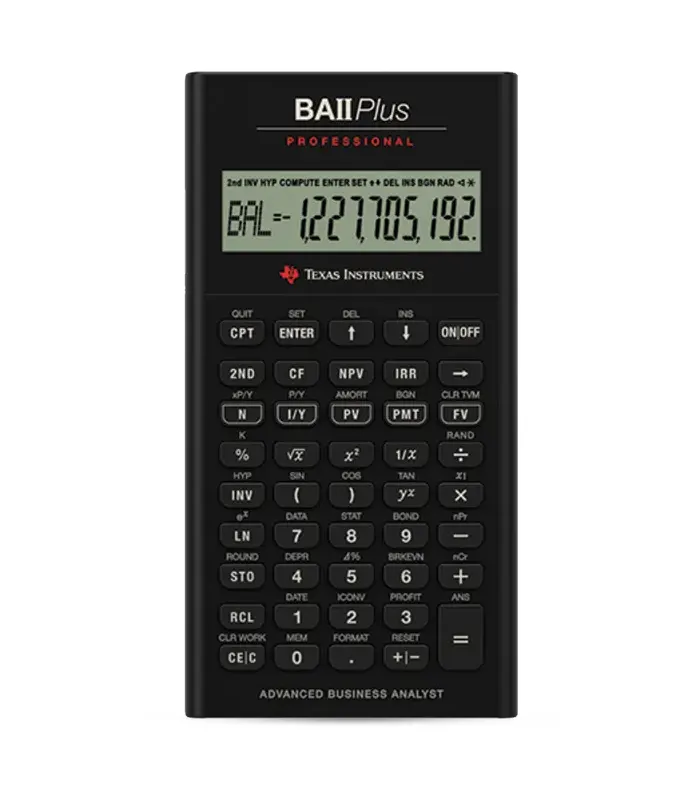
BA II Plus Professional

The BA II Plus Professional Financial Calculator is designed to meet the complex financial needs of professionals, students, and individuals in fields such as finance, accounting, real estate, and business. The calculator offers a comprehensive set of features and functions, making it a powerful tool for various financial calculations.

The BA II Plus Professional Financial Calculator is an advanced financial tool manufactured by Texas Instruments, building upon the success of the BA II Plus. It is designed to meet the complex financial needs of professionals, students, and individuals in fields such as finance, accounting, real estate, and business. The calculator offers a comprehensive set of features and functions, making it a powerful tool for various financial calculations.

It’s a powerful calculator designed for students and professionals in various fields, especially in Financial Services.

Approved for high stakes exams

BA II Plus Professional- CFA and FRM

Key Features

Enhanced Functionality

The BA II Plus Professional extends the capabilities of the BA II Plus, providing additional features and functions for advanced financial calculations.

Time Value of Money (TVM) Functions

Like its predecessor, the calculator excels in TVM calculations, allowing users to solve problems related to present value, future value, annuities, and loan amortization.

Cash Flow Analysis

The calculator includes robust cash flow analysis tools, supporting calculations for net present value (NPV) and internal rate of return (IRR). This is crucial for evaluating the profitability of investments.

Statistical and Mathematical Functions

Building on its predecessor's capabilities, the BA II Plus Professional offers a wide range of statistical and mathematical functions for data analysis, regression, and more.

Bond Calculations

Dedicated functions for bond calculations enable users to determine bond prices, yields, and accrued interest with precision.

Depreciation and Amortization

The calculator supports various depreciation methods and includes an amortization worksheet, aiding in accounting and financial planning.

Multiple Worksheets

Multiple worksheets, such as TVM, Bond, and Amortization, provide a structured approach to different financial calculations.

Enhanced Display

The calculator features an enhanced display for better readability and clarity during complex calculations.

Professional Design

The BA II Plus Professional is designed with a professional and durable layout, suitable for everyday use in various financial environments.

Solver Function

The Solver function allows users to find optimal solutions to complex financial problems by iteratively adjusting variables.

The BA II Plus Professional offers enhanced functionality and additional features, including a more extensive set of statistical functions, a solver function, and a refined display.
Use the TVM worksheet to input values such as interest rate, number of periods, present value, and future value. The calculator will then compute the missing variable.
The Solver function allows you to find the optimal value of a variable in a complex equation. It’s useful for scenarios where you need to achieve a specific outcome and want the calculator to iteratively solve for a variable.
Yes, the BA II Plus Professional supports cash flow analysis, including the calculation of net present value (NPV) and internal rate of return (IRR) to evaluate the profitability of investment projects.
Utilize the dedicated bond functions on the Bond worksheet. Input parameters such as interest rate, number of periods, and payment frequency to calculate bond prices, yields, and accrued interest.
The calculator includes various statistical functions such as mean, standard deviation, and linear regression. These functions are accessible through the STAT and DATA keys.
Use the MODE key to switch between different modes (e.g., COMP for basic calculations, FIN for financial functions) and the WORK key to move between worksheets (e.g., TVM, Bond, Solver).
Yes, the user manual is typically included with the calculator. It provides detailed instructions on how to use each function and worksheet. Online resources may also be available for additional guidance.
Yes, the calculator supports various depreciation methods such as straight-line and declining balance. Access these functions through the DEPR worksheet.
Use the CEC key to clear the most recent entry, and the C button to clear the entire worksheet. Be cautious with clearing to avoid unintended data loss.

Bulk Quote for

Texas Instruments

BA II Plus Professional

Request for Demo

We're here to support your journey toward innovation and success